

Kstudio Project Manager 4 offers an intelligent approach to managing 3D assets in 3ds Max. Its local AI engine can automatically classify 3D models, discover visually similar assets and help artists find them by category, material, style, colour and appearance. Read our news for more details and get the special offer at the end of the article!
An Asset Library That Organises Itself
At the heart of Project Manager 4 is a built-in AI classification engine that analyses model previews and automatically suggests relevant categories.
The system can recognise characteristics such as:
- Object type, including chairs, sofas, tables, lamps and other assets
- Materials such as wood, glass, metal and fabric
- Furniture category, shape and visual style
- Brand or design style when these can be identified from the preview
All categories are assigned virtually. Project Manager does not move files or modify the existing folder structure.
This makes it possible to introduce intelligent organisation to a library that may have been collected over many years without disrupting current production workflows.
All of this analysis runs locally, on the artist's own machine. Nothing is uploaded to the cloud, no external service is involved and no subscription is required — libraries containing confidential client work never leave the workstation.
Find Assets by Appearance
Project Manager 4 allows artists to search by visual appearance instead of relying exclusively on filenames and manually entered tags.
With the Find Similar feature, users can select any model and locate visually related assets in the current folder or across the entire library. Results are ranked by similarity, making it easier to compare alternative designs without manually opening dozens of files.
The reference does not have to be another 3D asset. Users can drag a photograph, render, mood-board image or pencil sketch into Project Manager and search their existing library for models with a similar shape or visual character.
This is particularly useful during the early design stages, when the artist may know how an object should look but not where it is stored or how it was named.
Reference images can also be saved as reusable Reference Sets, allowing artists to maintain visual collections for individual projects, clients or design directions.
Search by Colour
Project Manager 4 analyses the colours found in model previews and texture files.
Artists can select one or more colours from a palette and immediately narrow the library to matching models or textures. The search uses perceptual colour similarity, so results are based on how colours appear rather than requiring an exact RGB value.
Colour filters can be combined with:
- AI-generated categories
- Materials
- Text queries
- Asset types
- Colour labels
- Other Project Manager filters
For example, an artist could search for coffee tables, restrict the results to glass and metal, and then narrow the selection to models matching the colours of a client’s reference image.
Instead of attempting to create one perfect search query, users can progressively refine the results until the most suitable asset appears.
Explore 3ds Max Files Without Opening
Project Manager 4 also makes it easier to inspect the contents of 3ds Max files before loading them into the current scene.
The Gallery for .max files includes dedicated views for:
- Asset previews
- Materials
- External files
- Linked resources
Artists can examine the material structure of a scene, review its textures and inspect external dependencies without opening the source file in 3ds Max.
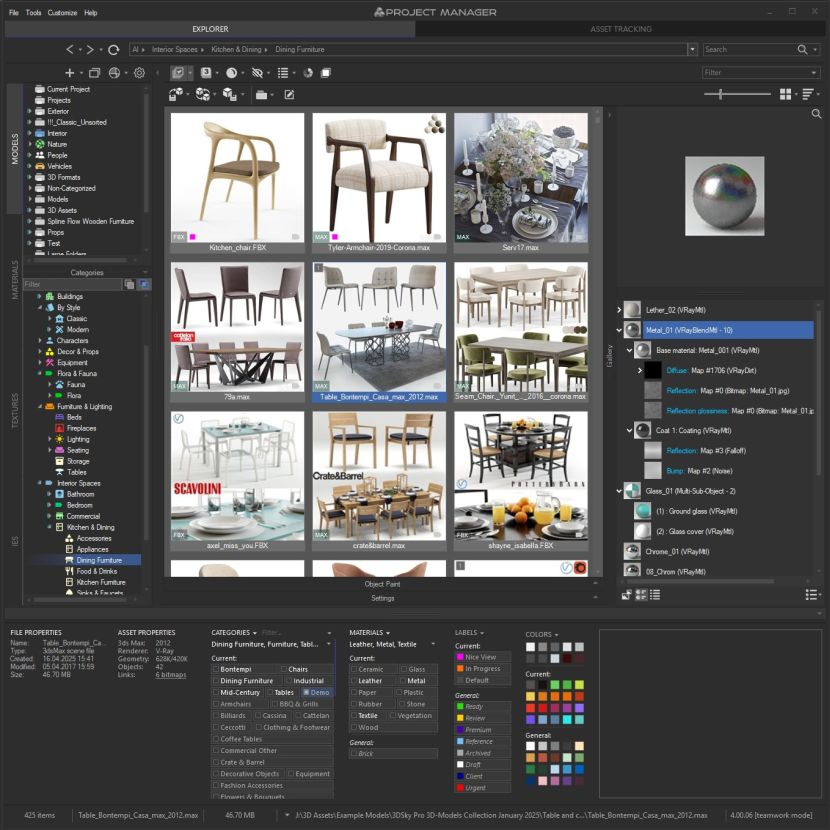
Materials can be dragged directly from another .max file into the active scene. This removes the usual process of opening a large source project, locating the required material, saving it separately and returning to the working scene.
Missing textures and other external links can also be repaired directly from the Gallery. This is especially helpful when working with downloaded models, archived projects or libraries transferred between workstations.
For FBX, OBJ, 3DS and other supported formats, an integrated 3D viewer allows artists to inspect geometry before importing it.
Designed for Individual Artists and Studios
Project Manager can be used on a single workstation or connected to a shared database for team workflows.
Colour Labels allow users to create custom statuses such as:
- Draft
- In Review
- Approved
- Client Selection
- Archived
Everyone using the shared library can see the current status of an asset and filter the collection accordingly.
This provides a simple way to organise review processes and communicate asset status without moving files between folders or creating duplicate versions.
The Project Manager interface is now localised into 12 languages, making the software more accessible to artists and international visualisation teams.
Migration from Project Manager 3 is straightforward. Versions 3 and 4 use the same database format, allowing studios to test or introduce the new release gradually without rebuilding their existing library.
Existing files remain in place, familiar workflows continue to function, and the new AI tools are added on top of the established asset-management system.
What Comes Next
Kstudio continues to integrate AI into everyday asset-management workflows.
A forthcoming Project Manager update will introduce a new way to work with large asset libraries, without navigating through folder trees or remembering the exact names originally assigned to files.
The feature is designed to make finding assets feel more natural and direct, particularly when working with extensive libraries accumulated across many projects.
More details will be announced soon.
Licensed Project Manager users can already access an early beta of the upcoming search experience from the My Account → Downloads section of the Kstudio website.
Try Project Manager 4
Project Manager 4 combines automatic AI classification, visual similarity search, colour matching, advanced filtering and detailed .max file inspection in one asset-management environment for 3ds Max
It helps artists and studios spend less time navigating folders, sorting files and opening unsuitable assets — and more time creating their scenes.
Learn more about Project Manager 4
Special offer for RebusFarm readers: use coupon code REBUSFARM-TGYUNF to receive 15% off Project Manager until 1 November, 2026.
--------------------------------KStudio develops professional tools for 3D artists, focusing on improving everyday workflows in 3ds Max. Their suite of plugins, including Project Manager and now the PBR Materials Generator, are trusted by thousands of professionals worldwide.